Crafting Your Ideal Home Office: 8 Ergonomic Essentials for 2026
Crafting Your Ideal Home Office: 8 Ergonomic Essentials for 2026
In an increasingly remote and hybrid work landscape, the home office has evolved from a temporary solution into a crucial hub for productivity and well-being. As we move into 2026, the importance of a well-designed, ergonomic home office cannot be overstated. It’s not just about having a desk and a chair; it’s about creating an environment that supports your physical health, mental focus, and sustained productivity throughout your workday. Investing in an ergonomic home office is an investment in your long-term health and career.
Many of us have experienced the pitfalls of a poorly set up workspace: back pain, neck strain, eye fatigue, and decreased concentration. These issues are not merely inconveniences; they can lead to chronic health problems and significantly impact your quality of life and work performance. This comprehensive guide will walk you through the 8 essential ergonomic considerations for building a home office that not only looks great but also champions your health and elevates your efficiency in 2026 and beyond.
From the foundational pieces like your chair and desk to crucial accessories and environmental factors, we’ll cover everything you need to know to create a truly optimized workspace. Let’s dive into the core elements that define a superior ergonomic home office.
1. The Ergonomic Chair: Your Foundation for Comfort and Support
The cornerstone of any effective ergonomic home office is undoubtedly a high-quality ergonomic chair. This isn’t an item to skimp on. A good ergonomic chair provides crucial support for your spine, reduces pressure points, and encourages proper posture, preventing a host of musculoskeletal issues.
Key Features to Look for in an Ergonomic Chair:
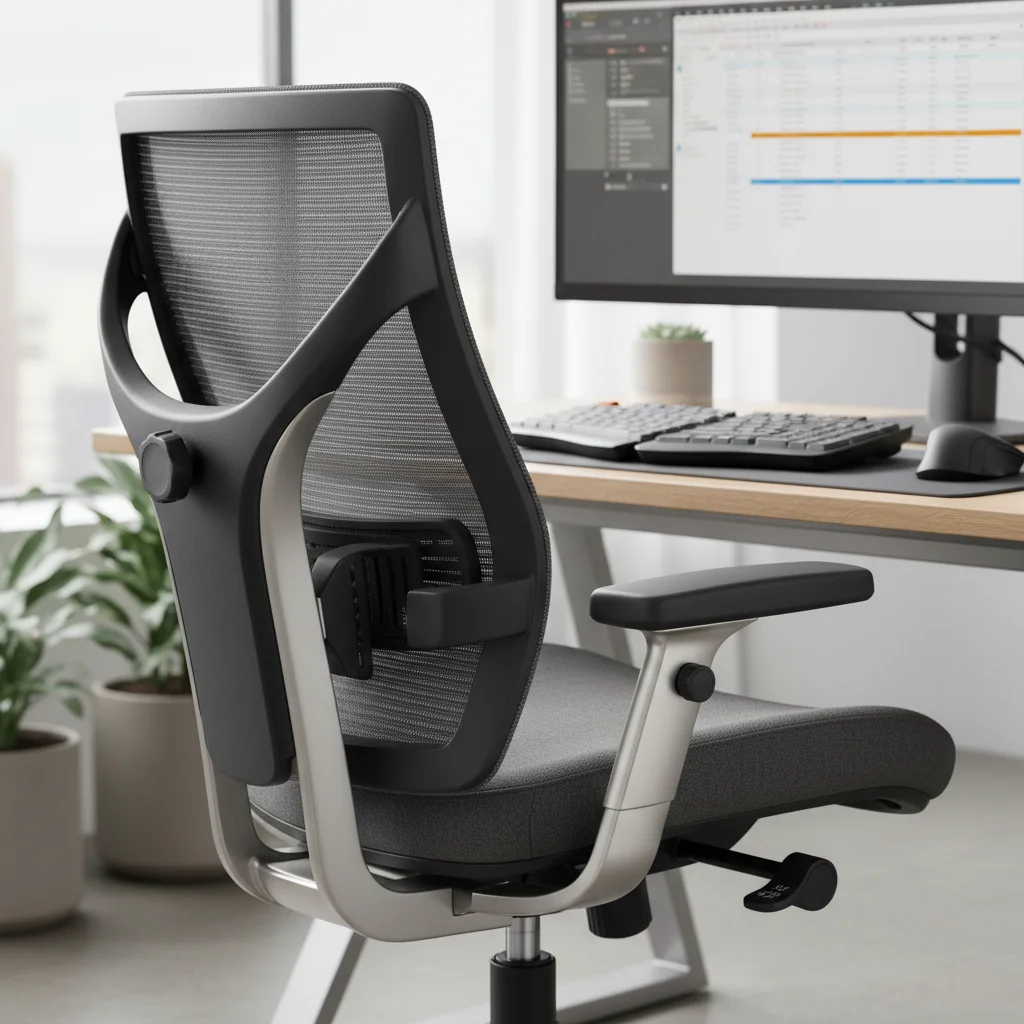
- Adjustable Lumbar Support: Your chair should have adjustable lower back support that can be moved up, down, in, and out to perfectly match the curve of your spine. This helps maintain the natural S-shape of your back, preventing slouching and pain.
- Height Adjustability: The seat height should be easily adjustable to allow your feet to rest flat on the floor (or a footrest) with your knees at a 90-degree angle. This promotes healthy circulation and reduces pressure on your lower back.
- Armrests: Adjustable armrests are vital. They should allow you to rest your arms comfortably, keeping your shoulders relaxed and your elbows close to your body, ideally at a 90-degree angle when typing. This alleviates strain on your neck and shoulders.
- Seat Depth and Tilt: The seat pan should be adjustable in depth so that you can sit with your back against the backrest and still have about 2-4 inches between the front edge of the seat and the back of your knees. A tilt mechanism allows you to recline slightly, which can take pressure off your spine.
- Breathable Material: Look for chairs made from breathable fabrics to prevent heat buildup, especially during long working hours.
When selecting your ergonomic chair, consider spending some time researching and testing different models if possible. Think of it as a long-term investment in your health and productivity within your ergonomic home office.
2. The Adjustable Standing Desk: Dynamic Work for a Healthier You
The adage ‘sitting is the new smoking’ has gained significant traction, and for good reason. Prolonged sitting can contribute to various health problems, including cardiovascular disease, diabetes, and obesity. An adjustable standing desk, or sit-stand desk, offers a dynamic solution, allowing you to alternate between sitting and standing throughout the day. This simple change can dramatically improve your health and energy levels in your ergonomic home office.
Benefits of an Adjustable Standing Desk:
- Reduced Sedentary Behavior: Breaking up long periods of sitting with standing helps activate muscles and improve circulation.
- Improved Posture: Standing encourages better posture, engaging your core and back muscles.
- Increased Energy and Focus: Many users report feeling more energized and focused when they incorporate standing into their workday.
- Reduced Back Pain: For individuals suffering from chronic back pain, alternating between sitting and standing can provide significant relief.
When choosing a standing desk, look for models that are sturdy, have a smooth and quiet adjustment mechanism (electric is often preferred), and offer a sufficient height range to accommodate both your sitting and standing positions comfortably. Ensure the desk can support the weight of all your equipment. Integrating a standing desk is a key step towards a truly dynamic and healthy ergonomic home office.
3. Monitor Placement and Ergonomic Displays: Protect Your Eyes and Neck
Incorrect monitor placement is a common culprit behind neck strain, shoulder pain, and eye fatigue. Proper monitor setup is a critical component of an effective ergonomic home office.
Optimal Monitor Setup:
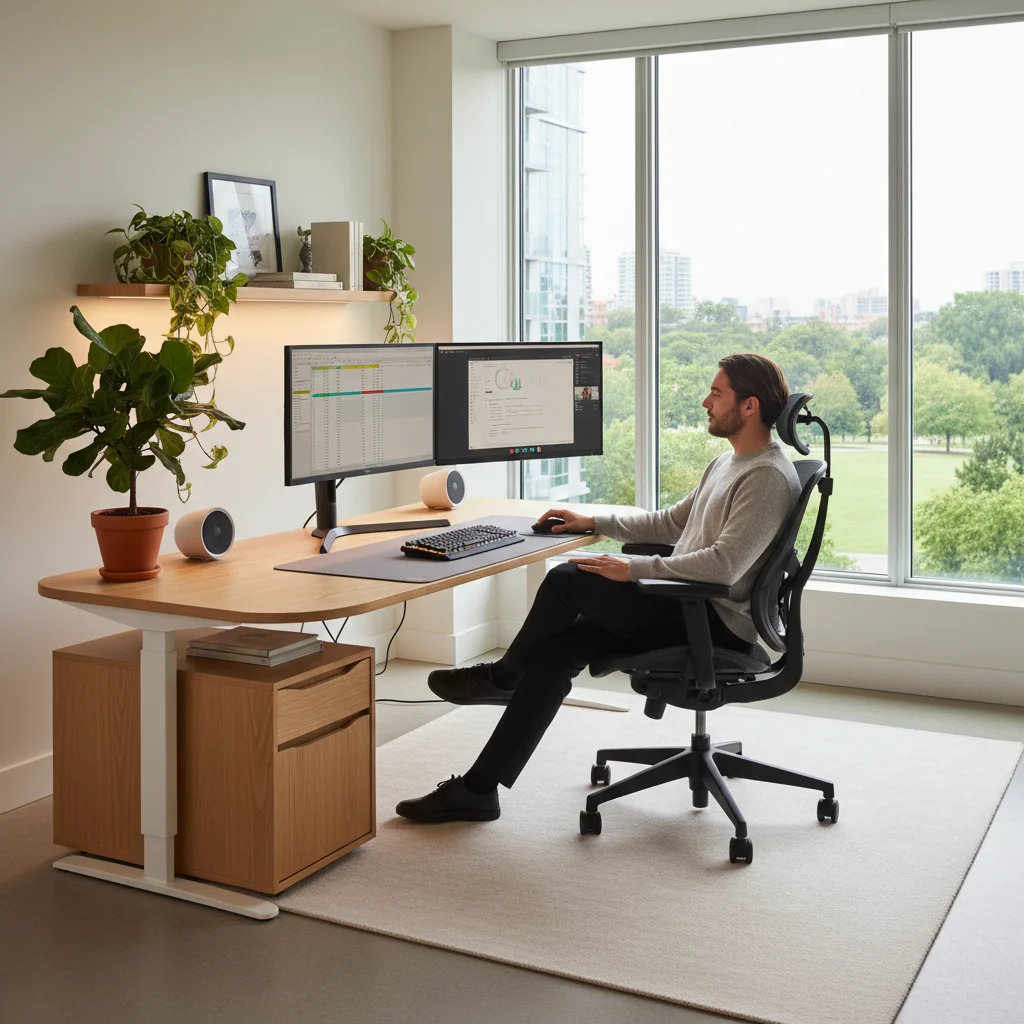
- Eye Level: The top of your monitor screen should be at or slightly below eye level when you are sitting straight. If you use multiple monitors, arrange them in an arc directly in front of you.
- Arm’s Length Distance: Position your monitor approximately an arm’s length away from your face. This reduces eye strain and allows you to view the entire screen comfortably without excessive head or eye movement.
- Monitor Arms: Investing in a monitor arm or stand is highly recommended. These allow for easy adjustment of height, tilt, and swivel, ensuring you can achieve the perfect position for your monitor(s).
- Glare Reduction: Position your monitor to avoid glare from windows or overhead lighting. If glare is unavoidable, consider using an anti-glare screen protector or adjusting your lighting.
Ensuring your monitor is correctly positioned is a simple yet profoundly impactful change you can make to your ergonomic home office setup, significantly reducing discomfort and improving visual health.
4. Ergonomic Keyboard and Mouse: Minimize Repetitive Strain
Your keyboard and mouse are extensions of your hands, and using poorly designed peripherals for hours on end can lead to repetitive strain injuries (RSIs) like carpal tunnel syndrome or tendonitis. An ergonomic home office prioritizes tools that support natural hand and wrist positions.
Choosing Ergonomic Peripherals:
- Ergonomic Keyboard: Look for keyboards with a split design, curved layout, or negative tilt that allows your wrists to remain in a neutral, straight position. Padded wrist rests can also provide support, but ensure they don’t elevate your wrists too high.
- Ergonomic Mouse: Vertical mice, trackballs, or contoured mice can reduce wrist pronation and provide a more natural grip, reducing strain on your hand and wrist. Experiment with different types to find what feels most comfortable for you.
- Mouse Placement: Keep your mouse as close to your keyboard as possible to avoid overreaching, which can strain your shoulder.
- Light Touch: Opt for keyboards and mice that require a light touch to activate, reducing the force you exert with each click or keystroke.
The right keyboard and mouse are small but mighty components in preventing long-term discomfort and injury in your ergonomic home office.
5. Proper Lighting: Illuminate Your Productivity, Reduce Eye Strain
Lighting often gets overlooked in home office setups, but it plays a crucial role in eye comfort, mood, and overall productivity. Poor lighting can lead to eye strain, headaches, and even affect your circadian rhythm. A well-lit ergonomic home office balances natural and artificial light sources.
Optimizing Your Office Lighting:
- Natural Light: Position your desk to take advantage of natural light, ideally with a window to your side to avoid glare on your screen or shadows on your work.
- Ambient Lighting: Use soft, diffused overhead lighting that evenly illuminates the room without creating harsh shadows.
- Task Lighting: A good desk lamp is essential for focused tasks. Choose one with adjustable brightness and color temperature (warm white is often preferred for comfort) to illuminate your immediate workspace without causing glare on your screen.
- Avoid Glare: Ensure no direct light sources are shining directly into your eyes or reflecting off your screen.
- Blue Light Filters: Consider using blue light filtering glasses or software on your devices, especially if you work late, to reduce eye strain and support healthy sleep patterns.
Thoughtful lighting design is paramount for maintaining eye health and a comfortable working environment in your ergonomic home office.
6. Footrest and Anti-Fatigue Mat: Support from the Ground Up
While often considered secondary, a footrest for sitting and an anti-fatigue mat for standing can significantly enhance the ergonomics of your home office, providing support from the ground up.
Benefits of a Footrest (Sitting):
- Proper Posture: If your chair is too high or you’re shorter, a footrest ensures your feet are flat and your knees are at a 90-degree angle, maintaining correct spinal alignment.
- Improved Circulation: Elevating your feet slightly can improve blood flow and reduce pressure on your legs.
- Reduced Leg and Back Strain: It helps distribute weight evenly and reduces strain on your lower back and legs.
Benefits of an Anti-Fatigue Mat (Standing):
- Cushioning: A good anti-fatigue mat provides a soft, supportive surface that reduces pressure on your feet, legs, and back when standing for extended periods.
- Improved Circulation: The slight give of the mat encourages subtle movements, which can stimulate blood flow.
- Reduced Discomfort: It significantly reduces fatigue and discomfort associated with standing on hard surfaces.
These accessories are small additions that make a big difference in the overall comfort and health benefits of your ergonomic home office.
7. Cable Management: Declutter for Focus and Safety
While not strictly ergonomic in the sense of posture, effective cable management contributes significantly to a functional, safe, and stress-free ergonomic home office. A tangled mess of cables can be a source of frustration, distraction, and even a tripping hazard.
Strategies for Effective Cable Management:
- Cable Ties and Sleeves: Use velcro ties, zip ties, or cable sleeves to bundle wires together, keeping them neat and organized.
- Cable Trays and Raceways: Mount cable trays or raceways under your desk to keep cables off the floor and out of sight.
- Wireless Peripherals: Where possible, opt for wireless keyboards, mice, and headphones to reduce the number of cables.
- Power Strips with Surge Protection: Consolidate power cords into a single surge protector, keeping outlets organized and protecting your equipment.
- Labeling: Labeling cables can save you a lot of headache when you need to unplug or move equipment.
A clean, organized workspace fosters a clear mind, promoting better focus and reducing stress in your ergonomic home office. It also ensures safety by preventing accidental disconnections or tripping hazards.
8. Incorporating Movement and Breaks: The Human Element of Ergonomics
Even the most perfectly designed ergonomic home office cannot compensate for prolonged static postures. The final, and perhaps most crucial, ergonomic essential is to actively incorporate movement and regular breaks into your workday.
Strategies for Movement and Breaks:
- The 20-20-20 Rule: Every 20 minutes, look at something 20 feet away for 20 seconds. This helps reduce eye strain.
- Micro-Breaks: Take short breaks every hour to stand up, stretch, or walk around for a few minutes. If you have a standing desk, alternate between sitting and standing regularly.
- Scheduled Longer Breaks: Step away from your desk for lunch or a longer break. Use this time to move your body, get some fresh air, or do something completely unrelated to work.
- Stretching: Incorporate simple stretches for your neck, shoulders, wrists, and back throughout the day. There are many online resources for office-friendly stretches.
- Hydration: Keep a water bottle nearby and refill it regularly. This encourages short walks and ensures you stay hydrated, which is vital for overall health and cognitive function.
Remember, ergonomics isn’t just about the equipment; it’s about the interaction between you and your environment. Active movement is a non-negotiable aspect of a truly healthy and productive ergonomic home office.
Beyond the Essentials: Cultivating a Holistic Ergonomic Home Office
While the eight points above cover the fundamental ergonomic essentials for your home office in 2026, creating a truly optimal workspace often involves considering a broader, more holistic approach. Think about the overall ambiance and how it impacts your mental and physical state.
Additional Considerations for Your Ergonomic Home Office:
- Temperature and Air Quality: Ensure your workspace is at a comfortable temperature and has good air circulation. Consider an air purifier if you have allergies or live in an area with poor air quality.
- Noise Control: Minimize distractions by using noise-canceling headphones, a white noise machine, or choosing a quiet area for your office.
- Personalization: Add personal touches that inspire you and make your space feel comfortable and inviting. This could include plants, photos, or artwork. Plants, in particular, can improve air quality and reduce stress.
- Mindfulness and Focus Tools: Explore apps or techniques like the Pomodoro Technique to structure your work and breaks, enhancing focus and preventing burnout.
- Regular Review: Periodically assess your setup. Do you feel any new aches or pains? Are there new ergonomic products that could further improve your experience? Your body’s needs can change, and your ergonomic home office should adapt with you.
The goal is to create an environment where you can not only perform your best work but also maintain your health and well-being over the long term. A proactive approach to your home office ergonomics will pay dividends in terms of reduced discomfort, increased energy, and sustained productivity.
Conclusion: Investing in Your Ergonomic Home Office for a Brighter Future
As remote and hybrid work models solidify their place in the professional landscape, the importance of a thoughtfully designed ergonomic home office will only continue to grow. By prioritizing the 8 essential elements discussed – an ergonomic chair, an adjustable standing desk, proper monitor placement, ergonomic peripherals, optimal lighting, footrests/anti-fatigue mats, effective cable management, and incorporating regular movement – you are laying the groundwork for a workspace that supports your health, enhances your focus, and maximizes your productivity.
Remember that ergonomics is not a one-time setup; it’s an ongoing commitment to your well-being. Regularly assess your posture, listen to your body, and make adjustments as needed. A comfortable, healthy, and efficient home office is within your reach. Embrace these ergonomic principles in 2026, and transform your home workspace into a sanctuary of productivity and sustained well-being.
Your body and your work will thank you for it. Start implementing these changes today and experience the profound difference a truly ergonomic home office can make in your daily life.